1. Admin Toolbar
-
Located at the top of the dashboard.
-
Contains shortcuts like visiting your site, viewing updates, and accessing your profile.

2. Menu Bar (Left Sidebar)
-
Dashboard: Displays website stats, updates, and quick actions.

-
Posts: Manage blog posts, add new posts, and edit existing ones.

-
Media: Upload and manage images, videos, and other media files.

-
Pages: Create and edit website pages like “About Us” or “Contact.”

-
Comments: View, approve, reply, or delete comments from visitors.

-
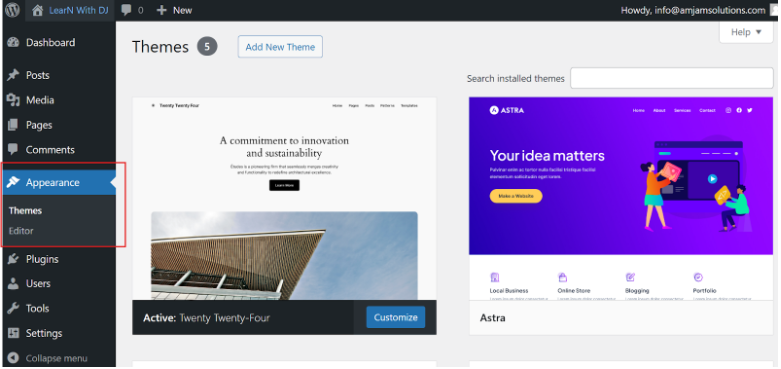
Appearance: Customize your website’s theme, widgets, menus, and more.
-
Plugins: Add, activate, or deactivate plugins to extend your website’s functionality.

-
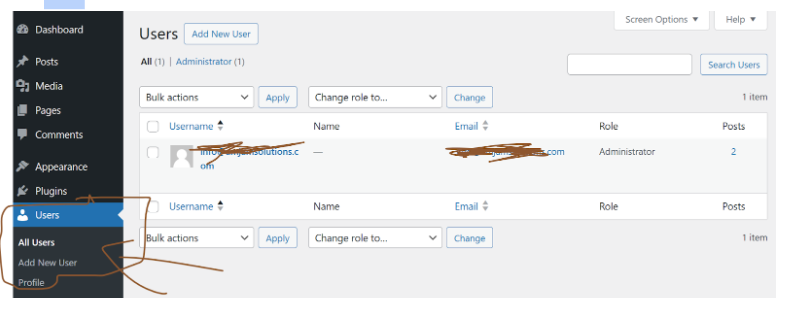
Users: Manage user accounts and roles (like admins or contributors).
-
Tools: Access import/export options and other utilities.

-
Settings: Configure general website settings, like the site title, time zone, or permalink structure.

3. Main Dashboard Area
-
Displays widgets like site activity, quick drafts, and recent posts.
-
You can customize this area by adding or removing widgets.

4. Screen Options
-
Found at the top-right corner of the dashboard.
-
Allows you to show or hide specific sections on your dashboard.

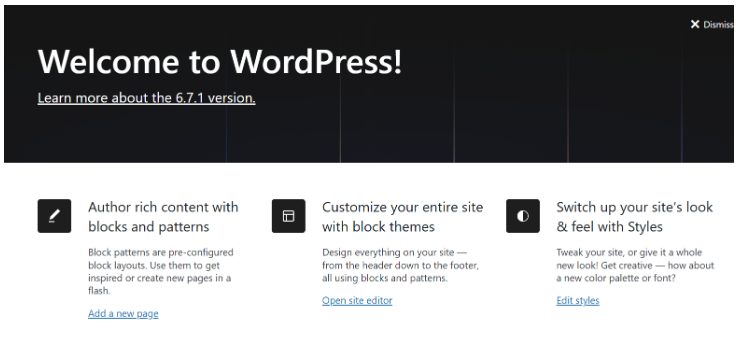
5. Welcome Panel
-
A helpful introduction for new users.
-
Provides links for setting up your site, customizing themes, and more.
6. At a Glance
-
Shows a quick summary of your site, including the number of posts, pages, and comments.

Free downloads
Found this useful? Get our free cheatsheets
SEO cheatsheet, Google Business checklist and a full course guide. Enter your WhatsApp number to download them instantly.