- HTML documents must start with a document type declaration: <!DOCTYPE html>
- The HTML document itself begins with <html> and ends with </html>.
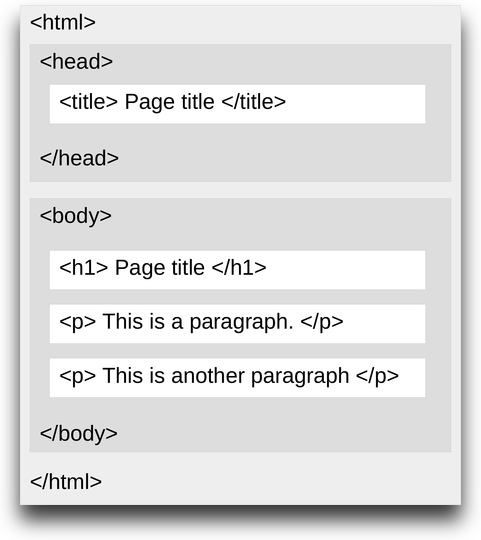
<!DOCTYPE html>

<html>

<head>

<title>Page Title</title>

</head>

<body>

<h1>My Heading</h1>

<p>My paragraph.</p>

</body>
</html>
- The <!DOCTYPE html> declaration defines that this document is an HTML5 document
- The <html> element is the root element of an HTML page
- The <head> element contains the title of the document and other information that is not displayed on the web page:
- The <title> element specifies a title for the HTML page (which is shown in the browser’s title bar or in the page’s tab)
- The <body> element defines the document’s body and is a container for all the visible contents, such as headings, paragraphs, images, hyperlinks, tables, lists, etc.
The <h1> element defines a large heading
More videos on this topic
A simple HTML program (Hindi, Tutorial 3)
Free downloads
Found this useful? Get our free cheatsheets
SEO cheatsheet, Google Business checklist and a full course guide. Enter your WhatsApp number to download them instantly.